talk-data.com talk-data.com

Topic

Power BI

Microsoft Power BI

bi data_visualization microsoft

201

tagged

Activity Trend

16 peak/qtr
2020-Q1 2026-Q1

Activities

201 activities · Newest first

Cloud Fetch: High-bandwidth Connectivity With BI Tools

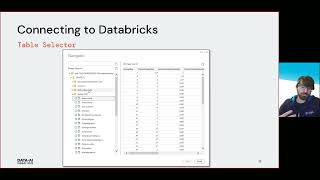
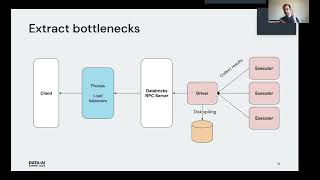
Business Intelligence (BI) tools such as Tableau and Microsoft Power BI are notoriously slow at extracting large query results from traditional data warehouses because they typically fetch the data in a single thread through a SQL endpoint that becomes a data transfer bottleneck. Data analysts can connect their BI tools to Databricks SQL endpoints to query data in tables through an ODBC/JDBC protocol integrated in our Simba drivers. With Cloud Fetch, which we released in Databricks Runtime 8.3 and Simba ODBC 2.6.17 driver, we introduce a new mechanism for fetching data in parallel via cloud storage such as AWS S3 and Azure Data Lake Storage to bring the data faster to BI tools. In our experiments using Cloud Fetch, we observed a 10x speed-up in extract performance due to parallelism.

Connect with us: Website: https://databricks.com Facebook: https://www.facebook.com/databricksinc Twitter: https://twitter.com/databricks LinkedIn: https://www.linkedin.com/company/data... Instagram: https://www.instagram.com/databricksinc/

Databricks Meets Power BI

Databricks and Spark are becoming increasingly popular and are now used as a modern data platform to analyze real-time or batch data. In addition, Databricks offers a great integration for machine learning developers.

Power BI, on the other hand, is a great platform for easy graphical analysis of data, and it's a great way to bring hundreds of different data sources together, analyze them together and make them accessible on any device.

So let's just bring both worlds together and see how well Databricks works with Power BI.

Connect with us: Website: https://databricks.com Facebook: https://www.facebook.com/databricksinc Twitter: https://twitter.com/databricks LinkedIn: https://www.linkedin.com/company/data... Instagram: https://www.instagram.com/databricksinc/

Pro Power BI Dashboard Creation: Building Elegant and Interactive Dashboards with Visually Arresting Analytics

Produce high-quality, visually attractive analysis quickly and effectively with Microsoft’s key BI tool. This book teaches analysts, managers, power users, and developers how to harness the power of Microsoft’s self-service business intelligence flagship product to deliver compelling and interactive insight with remarkable ease. It then shows you the essential techniques needed to go from source data to dashboards that seize your audience’s attention and provide them with clear and accurate information. As well as producing elegant and visually arresting output, you learn how to enhance the user experience through adding polished interactivity. This book shows you how to make interactive dashboards that allow you to guide users through the meaning of the data that they are exploring. Drill down features are also covered that allow you and your audience to dig deeper and uncover new insights by exploring anomalous and interesting data points. Reading this book builds your skills around creating meaningful and elegant dashboards using a range of compelling visuals. It shows you how to apply simple techniques to convert data into business insight. The book covers tablet and smartphone layouts for delivering business value in today’s highly mobile world. You’ll learn about formatting for effect to make your data tell its story, and you’ll be a master at creating visually arresting output on multiple devices that grabs attention, builds influence, and drives change. What You Will Learn Produce designer output that will astound your bosses and peers Make new insights as you chop and tweak your data as never before Create high-quality analyses in record time Create interdependent charts, maps, and tables Deliver visually stunning information Drill down through data to provide unique understandings Outshinecompeting products and enhance existing skills Adapt your dashboard delivery to mobile devices Who This Book Is For For any Power BI user who wants to strengthen their ability to deliver compelling analytics via Microsoft’s widely adopted analytics platform. For those new to Power BI who want to learn the full extent of what the platform is capable of. For power users such as BI analysts, data architects, IT managers, accountants, and C-suite members who want to drive change in their organizations.

Mastering Microsoft Power BI - Second Edition

Dive deep into Microsoft Power BI with the second edition of 'Mastering Microsoft Power BI'. This comprehensive book equips you with the skills to transform business data into actionable insights using Power BI's latest features and techniques. From efficient data retrieval and transformation processes to creating interactive dashboards that tell impactful data stories, you will learn actionable knowledge every step of the way. What this Book will help me do Learn to master data collection and modeling using the Power Query M language Gain expertise in designing DirectQuery, import, and composite data models Understand how to create advanced analytics reports using DAX and Power BI visuals Learn to manage the Power BI environment as an administrator with Premium capacity Develop insightful, scalable, and visually impactful dashboards and reports Author(s) Greg Deckler, a seasoned Power BI expert and solution architect, and None Powell, an experienced BI consultant and data visualization specialist, bring their extensive practical knowledge to this book. Together, they share their real-world expertise and proven techniques applying Power BI's diverse capabilities. Who is it for? This book is ideal for business intelligence professionals and intermediate Power BI users. If you're looking to master data visualization, prepare insightful dashboards, and explore Power BI's full potential, this is for you. Basic understanding of BI concepts and familiarity with Power BI will ensure you get the most value.

Microsoft Power BI Data Analyst Certification Guide

This book is your ultimate companion to mastering Microsoft Power BI and becoming proficient in data analysis and visualization. With a focus on understanding and utilizing Power BI to its fullest extent, this guide also prepares you comprehensively for the PL-300 certification exam. You will go from the basics to advanced techniques enabling you to confidently analyze and present data. What this Book will help me do Understand and connect to various data sources using Power BI. Gain skills in transforming and preparing data for advanced analysis. Develop expertise in designing and optimizing data models. Learn to create insightful reports and dashboards to convey information clearly. Prepare for and succeed in the PL-300 certification exam with practice questions. Author(s) Authors None Edenfield and None Corcoran bring extensive experience in business intelligence and data analytics to this book. They have years of hands-on expertise with Power BI and a passion for teaching analytics in a practical and accessible way. Together, they aim to empower readers to master Power BI and achieve their certification goals. Who is it for? This book is perfect for data analysts, business intelligence professionals, and anyone aiming to deepen their knowledge of Microsoft Power BI. Beginners will find approachable content to quickly get started while experienced users will find detailed topics to refine their expertise. By covering exam preparation and practical applications, this guide benefits a wide range of learners who wish to get certified and excel in data-centric roles.

AI-Powered Business Intelligence

Use business intelligence to power corporate growth, increase efficiency, and improve corporate decision making. With this practical book featuring hands-on examples in Power BI with basic Python and R code, you'll explore the most relevant AI use cases for BI, including improved forecasting, automated classification, and AI-powered recommendations. And you'll learn how to draw insights from unstructured data sources like text, document, and image files. Author Tobias Zwingmann helps BI professionals, business analysts, and data analytics understand high-impact areas of artificial intelligence. You'll learn how to leverage popular AI-as-a-service and AutoML platforms to ship enterprise-grade proofs of concept without the help of software engineers or data scientists. Learn how AI can generate business impact in BI environments Use AutoML for automated classification and improved forecasting Implement recommendation services to support decision-making Draw insights from text data at scale with NLP services Extract information from documents and images with computer vision services Build interactive user frontends for AI-powered dashboard prototypes Implement an end-to-end case study for building an AI-powered customer analytics dashboard

Up and Running with DAX for Power BI: A Concise Guide for Non-Technical Users

Take a concise approach to learning how DAX, the function language of Power BI and PowerPivot, works. This book focuses on explaining the core concepts of DAX so that ordinary folks can gain the skills required to tackle complex data analysis problems. But make no mistake, this is in no way an introductory book on DAX. A number of the topics you will learn, such as the concepts of context transition and table expansion, are considered advanced and challenging areas of DAX. While there are numerous resources on DAX, most are written with developers in mind, making learning DAX appear an overwhelming challenge, especially for those who are coming from an Excel background or with limited coding experience. The reality is, to hit the ground running with DAX, it’s not necessary to wade through copious pages on rarified DAX functions and the technical aspects of the language. There are just a few mandatory concepts that must be fully understood before DAX can be mastered. Knowledge of everything else in DAX is built on top of these mandatory aspects. Author Alison Box has been teaching and working with DAX for over eight years, starting with DAX for PowerPivot, the Excel add-in, before moving into the Power BI platform. The guide you hold in your hands is an outcome of these years of experience explaining difficult concepts in a way that people can understand. Over the years she has refined her approach, distilling down the truth of DAX which is “you can take people through as many functions as you like, but it’s to no avail if they don’t truly understand how it all works.” You will learn to use DAX to gain powerful insights into your data by generating complex and challenging business intelligence calculations including, but not limited to: Calculations to control the filtering of information to gain better insight into the data that matters to you Calculations across dates such as comparing data for thesame period last year or the previous period Finding rolling averages and rolling totals Comparing data against targets and KPIs or against average and maximum values Using basket analysis, such as “of customers who bought product X who also bought product Y” Using “what if” analysis and scenarios Finding “like for like” sales Dynamically showing TopN/BottomN percent of customers or products by sales Finding new and returning customers or sales regions in each month or each year Who This Book Is For Excel users and non-technical users of varying levels of ability or anyone who wants to learn DAX for Power BI but lacks the confidence to do so

Hjalmar Gislason is the Founder and CEO of GRID.is, a BI notebook company that has been making big waves in the field in the last few years. He tells us all about GRID.is and the rise of data notebooks. In this episode, you'll learn: [0:05:50] Hjalmar explains exactly what a data notebook is and how it compares to other tools.  [0:11:52] Reasons to consider using a data notebook along with a range of other tools. [0:27:30] The 'living' quality of the models that can be created on GRID.  [0:33:28] A special offer for AOF from Hjalmar and how to sign up immediately! For full show notes, and the links mentioned visit: https://bibrainz.com/podcast/85   Enjoyed the Show?  Please leave us a review on iTunes.

Artificial Intelligence with Power BI

Discover how to enhance your data analysis with 'Artificial Intelligence with Power BI,' a resource designed to teach you how to leverage Power BI's AI capabilities. You will learn practical methods for enriching your analytics with forecasting, anomaly detection, and machine learning, equipping you to create intelligent, insightful BI reports. What this Book will help me do Learn how to apply AI capabilities such as forecasting and anomaly detection to enrich your reports and drive actionable insights. Explore data preparation techniques optimized for AI, ensuring your datasets are structured for advanced analytics. Develop skills to integrate Azure Machine Learning and Cognitive Services into Power BI, expanding your analytical toolset. Understand how to build Q&A interfaces and integrate Natural Language Processing into your BI solutions. Gain expertise in training and deploying your own machine learning models to achieve tailored insights and predictive analytics. Author(s) None Diepeveen is an experienced data analyst and Power BI expert with a passion for making advanced analytics accessible to professionals. With years of hands-on experience working in the data analytics field, they deliver insights using intuitive, practical approaches through clear and engaging tutorials. Who is it for? This book is ideal for data analysts and BI developers who aim to expand their analytics capabilities with AI. Readers should already be familiar with Power BI and are looking for a resource to teach them how to incorporate predictive and advanced AI techniques into their reporting workflow. Whether you're seeking to gain a professional edge or enhance your organization's data storytelling and insights, this guide is perfect for you.

Microsoft Power BI Performance Best Practices

"Microsoft Power BI Performance Best Practices" is a thorough guide to mastering efficiently operating Power BI solutions. This book walks you through optimizing every layer of a Power BI project, from data transformations to architecture, equipping you with the ability to create robust and scalable analytics solutions. What this Book will help me do Understand how to set realistic performance goals for Power BI projects and implement ongoing performance monitoring. Apply effective architectural and configuration strategies to improve Power BI solution efficiency. Learn practices for constructing and optimizing data models and implementing Row-Level Security effectively. Utilize tools like DAX Studio and VertiPaq Analyzer to detect and resolve common performance bottlenecks. Gain deep knowledge of Power BI Premium and techniques for handling large-scale data solutions using Azure. Author(s) Bhavik Merchant is a recognized expert in business intelligence and analytics solutions. With extensive experience in designing and implementing Power BI solutions across industries, he brings a pragmatic approach to solving performance issues in Power BI. Bhavik's writing style reflects his passion for teaching, ensuring readers gain practical knowledge they can directly apply to their work. Who is it for? This book is designed for data analysts, BI developers, and data professionals who have foundational knowledge of Power BI and aim to elevate their skills to construct high-performance analytics solutions. It is particularly suited to individuals seeking guidance on best practices and tools for optimizing Power BI applications.

Introducing Charticulator for Power BI: Design Vibrant and Customized Visual Representations of Data

Create stunning and complex visualizations using the amazing Charticulator custom visuals in Power BI. Charticulator offers users immense power to generate visuals and graphics. To a beginner, there are myriad settings and options that can be combined in what feels like an unlimited number of combinations, giving it the unfair label, “the DAX of the charting world”. This is not true. This book is your start-to-finish guide to using Charticulator, a custom visualization software that Microsoft integrated into Power BI Desktop so that Power BI users can create incredibly powerful, customized charts and graphs. You will learn the concepts that underpin the software, journeying through every building block of chart design, enabling you to combine these parts to create spectacular visuals that represent the story of your data. Unlike other custom Power BI visuals, Charticulator runs in a separate application window within Power BI with its own interface and requires a different set of interactions and associated knowledge. This book covers the ins and outs of all of them. What You Will Learn Generate inspirational and technically competent visuals with no programming or other specialist technical knowledge Create charts that are not restricted to conventional chart types such as bar, line, or pie Limit the use of diverse Power BI custom visuals to one Charticulator custom visual Alleviate frustrations with the limitations of default chart types in Power BI, such as being able to plot data on only one categorical axis Use a much richer set of options to compare different sets of data Re-use your favorite or most often used chart designs with Charticulator templates Who This Book Is For The average Power BI user. It assumes no prior knowledge on the part of the reader other than being able to open Power BI desktop, import data, and create a simple Power BI visual. User experiences may vary, from people attending a Power BI training course to those with varying skills and abilities, from SQL developers and advanced Excel users to people with limited data analysis experience and technical skills.

Learn Power BI - Second Edition

Learn Power BI is a comprehensive guide to mastering Microsoft Power BI. With step-by-step instructions, this book equips you to analyze and visualize data effectively, delivering actionable business insights. Whether you're new to Power BI or seeking to deepen your knowledge, you'll find practical examples and hands-on exercises to enhance your skills. What this Book will help me do Master the basics of using Microsoft Power BI for data analysis. Learn to clean and transform datasets effectively using Power Query. Build analytical models and perform calculations using DAX. Design professional-quality reports, dashboards, and visualizations. Understand governance and deploy Power BI in organizational environments. Author(s) Greg Deckler is a recognized expert in business intelligence and analytics, bringing years of practical experience in using Microsoft Power BI for data-driven decision-making. As an accomplished author, Greg's approachable writing style helps readers of all levels. In his book, he conveys complex concepts in a clear, structured, and user-friendly manner. Who is it for? This book is ideal for IT professionals, data analysts, and individuals interested in business intelligence using Power BI. Whether you're a beginner or transitioning from other tools, it guides you through the basics to advanced features. If you want to harness Power BI to create impactful reports or dashboards, this book is for you.

Extreme DAX

Delve into advanced Data Analysis Expressions (DAX) concepts and Power BI capabilities with Extreme DAX, designed to elevate your skills in Microsoft's Business Intelligence tools. This book guides you through solving intricate business problems, improving your reporting, and leveraging data modeling principles to their fullest potential. What this Book will help me do Master advanced DAX functions and leverage their full potential in data analysis. Develop a solid understanding of context and filtering within Power BI models. Employ strategies for dynamic visualizations and secure data access via row-level security. Apply financial DAX functions for precise investment evaluations and forecasts. Utilize alternative calendars and advanced time-intelligence for comprehensive temporal analyses. Author(s) Michiel Rozema and Henk Vlootman bring decades of deep experience in data analytics and business intelligence to your learning journey. Both authors are seasoned practitioners in using DAX and Microsoft BI tools, with numerous practical deployments of their expertise in business solutions. Their approachable writing reflects their teaching style, ensuring you can easily grasp even challenging concepts. This book combines their comprehensive technical knowledge with real-world, hands-on examples, offering an invaluable resource for refining your skills. Who is it for? This book is perfect for intermediate to advanced analysts who have a foundational knowledge of DAX and Power BI and wish to deepen their expertise. If you are striving to improve performance and accuracy in your reports or aiming to handle advanced modeling scenarios, this book is for you. Prior experience with DAX, Power BI, or equivalent analytical tools is recommended to maximize the benefit. Whether you're a business analyst, data professional, or enthusiast, this book will elevate your analytical capabilities to new heights.

Extending Power BI with Python and R

Dive into the world of advanced analytics and visualizations in Power BI with "Extending Power BI with Python and R". This comprehensive guide will teach you how to integrate Python and R scripting into your Power BI projects, allowing you to build data models, transform data, and create rich visualizations. Learn practical techniques to make your Power BI dashboards more interactive and insightful. What this Book will help me do Master the integration of Python and R scripts into Power BI to enhance its functionality. Learn to implement advanced data transformations and enrichments using external APIs. Create advanced visualizations and custom visuals with R for improved analytics. Perform advanced data analysis including handling missing data using Python and R. Leverage machine learning techniques within Power BI projects to extract actionable insights. Author(s) None Zavarella is a data science expert and renowned author specializing in data analytics and visualization tools. With years of experience working with Power BI, Python, and R in diverse data-driven projects, Zavarella offers a unique perspective on enhancing Power BI capabilities. Passionate about teaching, they craft clear and impactful tutorials for learners. Who is it for? This book is perfect for business intelligence professionals, data scientists, and business analysts who already use Power BI and want to augment its features with Python and R. If you have a foundational understanding of Power BI and some basic familiarity with Python and R, this book will help you explore their combined potential for advanced analytics.

Managing and Visualizing Your BIM Data

Managing and Visualizing Your BIM Data is an essential guide for AEC professionals who want to harness the power of data to enhance their projects. Designed with a hands-on approach, this book delves into using Autodesk Dynamo for data collection and Microsoft Power BI for creating insightful dashboards. By the end, readers will be adept at connecting BIM models to interactive visualizations. What this Book will help me do Gain a deep understanding of data collection workflows in Autodesk Dynamo. Learn to connect Building Information Modeling (BIM) data to Power BI dashboards. Master the basics and advanced features of Dynamo for BIM data management. Create dynamic and visually appealing Power BI dashboards for AEC projects. Explore real-world use cases with expert-guided hands-on examples. Author(s) The authors, None Pellegrino, None Bottiglieri, None Crump, None Pieper, and None Touil, are experienced professionals in the AEC and software development industries. With extensive backgrounds in Building Information Modeling (BIM) and data visualization, they bring practical insights combined with a passion for teaching. Their approach ensures readers not only learn the tools but also understand the reasoning behind best practices. Who is it for? This book is ideal for BIM managers and coordinators, design technology managers, and other Architecture, Engineering, and Construction (AEC) professionals. Readers with a foundational knowledge of BIM will find it particularly beneficial for enhancing their data analysis and reporting capabilities. If you're aiming to elevate your skill set in managing BIM data and creating impactful visualizations, this guide is for you.

Power Query Cookbook

The "Power Query Cookbook" is your comprehensive guide to mastering data preparation and transformation using Power Query. With this book, you'll learn to connect to data sources, reshape data to fit business requirements, and use both no-code transformations and custom M code solutions to unlock the full potential of your data. Step-by-step examples will guide you through optimizing dataflows in Power BI. What this Book will help me do Master connecting to various data sources and performing intuitive transformations using Power Query. Learn to reshape and enrich data to meet complex business requirements efficiently. Explore advanced capabilities of Power Query, including M code and online dataflows. Develop custom data transformations with a blend of GUI-based and M code techniques. Optimize the performance of Power BI Dataflows using best practices and diagnostics tools. Author(s) None Janicijevic is a seasoned expert in data analytics, specializing in Microsoft Power BI and Power Query. With years of experience in data engineering and a passion for teaching, None brings a clear, actionable, and results-driven approach to demystifying complex technical concepts. Their work empowers professionals with the tools they need to excel in data-driven decision-making. Who is it for? This book is designed for data analysts, business intelligence developers, and data engineers aiming to enhance their skills in data preparation using Power Query. If you have a basic understanding of Power BI and want to delve into integrating and optimizing data from multiple sources, this book is for you. It's ideal for professionals seeking practical insights and techniques to improve data transformations. Novices with some exposure to BI tools will also find the material accessible and rewarding.

Microsoft Power BI Cookbook - Second Edition

"Microsoft Power BI Cookbook" is an advanced reference for professionals working with Power BI. Featuring over 90 practical, hands-on recipes, this book allows you to master Power BI for data modeling, creating dashboards, and optimizing queries. You will learn practical tips and techniques, enabling you to create effective and customized Power BI solutions for various business needs. What this Book will help me do Master advanced data cleansing and integration techniques in Power BI's Power Query Editor. Develop intuitive, efficient dashboards and reports using best practices for data visualization. Optimize performance for large datasets using aggregation tables and efficient query techniques. Implement sophisticated analysis and business logic using the power of DAX programming language. Deploy and manage Power BI solutions leveraging integration with Microsoft ecosystem tools. Author(s) Greg Deckler and None Powell are seasoned Power BI experts with extensive backgrounds in business intelligence and data solutions. Greg is a recognized Power BI consultant and author with a focus on delivering impactful BI solutions. None brings their experience in utilizing Power BI for diverse organizational needs. Together, they emphasize hands-on learning and actionable insights in their collaborative writing. Who is it for? This book is aimed at business intelligence professionals who already have a basic understanding of Power BI. Ideal readers are those seeking to deepen their knowledge of advanced features and apply best practices in their projects. Whether you're enhancing your existing Power BI skills or managing complex datasets, this book will provide the techniques and insights to excel in your role.

Ryan Wade joins us on AOF today to talk about how to use advanced analytics in your organization! Ryan has been in the analytics game for the last 20 years and is now a Senior Solution Consultant at Blue Granite, based in Indianapolis, Indiana. He recently authored the amazing must-read book, Advanced Analytics in Power BI with R and Python, and in today's chat, we get to hear all about why he wrote the book, who it is for and how you can use it to accelerate your data journey! I met Ryan while speaking at a few conferences and was always impressed with his knowledge and great sense of humor! A professional football player turned data scientist, Ryan has a passion for breaking down advanced analytics in a way anyone can understand. Whether you're already using advanced analytics or researching how to get started Ryan's knowledge on the topic will help you. Tune in with a pencil and paper in hand!   In this episode, you'll learn: [0:09:22] The rise of the R and Python programming languages in the data world. [0:16:44] The necessary, well-thought-out preparatory steps for a project utilizing advanced analytics. [0:19:39] Why attention-grabbing visuals are not the most important part of data storytelling! [0:23:13] Creating a sufficient team for data analytics and the vital roles of the database administrator, active directory administrator, and more! [0:39:07] Client conversations around shortcomings and hurdles in advanced analytics.  For full show notes, and the links mentioned visit: https://bibrainz.com/podcast/82   Enjoyed the Show?  Please leave us a review on iTunes.

Data Analytics Made Easy

By reading "Data Analytics Made Easy," you'll gain a solid understanding of data analysis and visualization without requiring coding skills. This book emphasizes practical knowledge and use cases, covering storytelling, automation, machine learning, and business dashboards with tools like KNIME and Power BI. What this Book will help me do Understand the fundamentals of data analytics and how to leverage data for business insights. Create and automate data workflows using the no-code KNIME Analytics Platform. Develop interactive dashboards and data visualizations with Microsoft Power BI. Learn the basics of machine learning and how to apply models for business use. Enhance presentations and influence decisions through effective data storytelling. Author(s) None De Mauro is an experienced author and professional in the field of data analytics. Passionate about making complex topics approachable, None specializes in explaining technical concepts in simpler terms, ensuring readers can easily grasp and apply them in their work. Who is it for? This book is perfect for professionals or beginners who want to work with and interpret data effectively. Ideal for individuals in business roles or management positions looking to enhance their skills in data analytics and build a foundational understanding of machine learning and visualization.

Expert Data Modeling with Power BI

Expert Data Modeling with Power BI provides a comprehensive guide to creating effective and optimized data models using Microsoft Power BI. This book will teach you everything you need to know, from connecting to data sources to setting up complex models that enable insightful reporting and business analytics. What this Book will help me do Gain expertise in implementing virtual tables and time intelligence functionalities in Power BI's DAX language. Identify and correctly set up Dimension and Fact tables using the Power Query Editor interface. Master advanced data preparation techniques to build efficient Star Schemas for modeling. Apply best practices for preparing and modeling data for real-world business cases. Become proficient in advanced features like aggregations, incremental refresh, and row-level security. Author(s) Soheil Bakhshi is a seasoned Power BI expert and author with years of experience in business intelligence and analytics. His practical knowledge of data modeling and approachable writing style make complex concepts understandable. Soheil's passion for empowering users to harness the full potential of Power BI is evident through his clear guidance and real-world examples. Who is it for? This book is perfect for business intelligence developers, data analysts, and advanced users of Power BI who aim to deepen their understanding of data modeling. It assumes a familiarity with Power BI's basic functions and core concepts like Star Schema. If you're looking to refine your modeling practices and create versatile, dynamic solutions, this resource is for you.